How to Choose an Email Marketing Platform for Your Business in the USA

Choosing the right email marketing platform is one of the most important marketing decisions for a growing business.
It affects how well your emails reach the inbox, how much revenue your automated flows can generate, how easy it is to segment customers, how accurately you can track performance, and how much your team will spend every month as your list grows.
Many businesses start with the most familiar platform. Others choose the cheapest plan. Some pick the tool their competitor uses.
But the best email marketing platform is not always the cheapest, most popular, or most advanced option. The right choice depends on your business model, list size, revenue stage, automation needs, integrations, compliance requirements, and internal team capacity.
For a small service business, a simple newsletter platform may be enough. For a Shopify brand doing $50,000 to $200,000 per month, a stronger ecommerce ESP can directly affect abandoned cart recovery, repeat purchases, and customer lifetime value. For a SaaS company, CRM integration and lead nurturing may matter more than product recommendation emails.
This guide will help you choose the right ESP system for your business in the USA using a practical framework, real cost scenarios, platform comparisons, compliance requirements, and revenue-based decision logic.
Quick Answer: How to Choose the Right Email Marketing Platform
The best email marketing platform depends on your business model. Ecommerce brands usually need Klaviyo or Omnisend, B2B and SaaS companies often need ActiveCampaign or HubSpot, small businesses may start with MailerLite, Brevo, Sender, or Mailchimp, and businesses with SMS needs should compare Omnisend and Brevo. Before choosing, compare deliverability, automation, integrations, pricing at scale, compliance, reporting, and team capacity.
Table of Contents
Why Choosing the Wrong Email Marketing Platform Can Cost More Than the Monthly Fee
How to Choose an Email Marketing Platform: 9 Key Criteria
3.1. Business Model Fit
3.2. Deliverability and Inbox Placement
3.3. USA Compliance Requirements
3.6. Integration Quality
3.7. Reporting and Revenue Attribution
Best Email Marketing Platforms by Business Type
4.1. Best ESP Platforms for Ecommerce and DTC Brands
6.1. Small Ecommerce Store
6.2. Growing Shopify Brand
6.3. SaaS Company
6.4. Local Service Business
How Lumilinx Helps Businesses Choose and Set Up the Right ESP
What Is an ESP?
ESP stands for Email Service Provider.
An ESP is a platform that helps businesses send marketing emails, manage subscribers, build automations, segment audiences, track campaign performance, and protect sender reputation.
In simple terms, an ESP is your email marketing system.
Popular ESP and email marketing platforms include:
Klaviyo
Mailchimp
ActiveCampaign
Omnisend
Brevo
HubSpot
MailerLite
Sender
Moosend
Constant Contact
GetResponse
A good ESP should help your business:
send email campaigns, create automated flows, segment customers, personalize emails, manage unsubscribes, track clicks, orders, and conversions, connect with Shopify, WooCommerce, CRM, or booking tools, support SPF, DKIM, and DMARC setup, protect deliverability, stay compliant with US email marketing laws.
The wrong ESP can create expensive problems. You may overpay for unused features, lose revenue because automations are too basic, struggle with poor inbox placement, or spend hours manually fixing things that should be automated.
If you are already comparing specific tools, start with our detailed guide on Klaviyo vs Mailchimp vs ActiveCampaign, where we break down which platform fits ecommerce brands, small businesses, and automation-heavy teams.
Why Choosing the Wrong Email Marketing Platform Can Cost More Than the Monthly Fee
Most businesses compare email platforms by looking at the starting price.
That is usually the wrong approach.
A platform may advertise a low monthly price, but your real cost can increase because of:
contact limits, send limits, unsubscribed contacts included in billing, SMS overages, advanced automation upgrades, additional users, dedicated IP costs, API limits, CRM add-ons, migration costs, template design costs, agency or specialist setup costs.
There is also a hidden revenue cost.
If your ESP does not support abandoned cart flows, post-purchase automation, customer segmentation, or clean revenue attribution, you may not see the money you are losing. The platform still “works,” but it does not support growth.
Example: The Real Cost of a Poor ESP Choice
Imagine an ecommerce store generating $80,000 per month in revenue.
If email marketing should reasonably contribute 20% of monthly revenue, that would be:
$80,000 x 20% = $16,000 per month from email
If weak automation, poor segmentation, or deliverability issues reduce email revenue by only 15%, the missed revenue could be:
$16,000 x 15% = $2,400 per month
That equals:
$2,400 x 12 = $28,800 per year in missed email-driven revenue
This does not mean every business is losing this exact amount. But it shows why choosing an email platform should not be based only on a $30 or $100 monthly subscription difference.
The real question is:
Can this platform help us generate, protect, and measure revenue?
How to Choose an Email Marketing Platform: 9 Key Criteria
Before comparing Klaviyo, Mailchimp, ActiveCampaign, Omnisend, Brevo, HubSpot, or any other platform, you need to understand what actually matters.
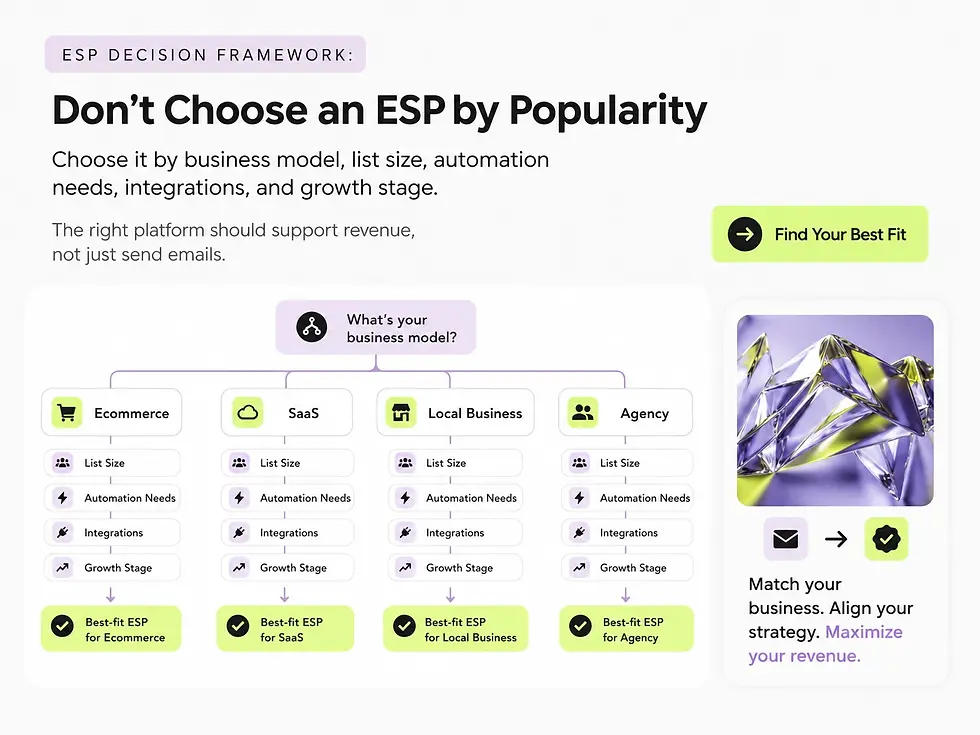
1. Business Model Fit
The first question is not “Which ESP is best?”
The first question is:
What kind of business are you running?
Different businesses need different email marketing systems.
Ecommerce and DTC Brands
Ecommerce businesses need platforms that can connect deeply with customer behavior and purchase data.
Important features include: abandoned cart flows, browse abandonment flows, post-purchase flows, product recommendation blocks, customer lifetime value segmentation, VIP customer segments, winback campaigns, review request emails, dynamic product feeds, Shopify or WooCommerce integration, revenue attribution.
For ecommerce, platforms like Klaviyo and Omnisend are often stronger than general newsletter tools because they are built around product and purchase behavior.
SaaS and B2B Companies
SaaS and B2B companies usually need lead nurturing and CRM logic more than product recommendation emails.
Important features include lead scoring, CRM integration, demo request follow-up, trial user onboarding, sales pipeline automation, lifecycle emails, webinar follow-ups, behavior-based
segmentation, sales team notifications, and longer nurturing sequences.
For this type of business, ActiveCampaign or HubSpot may be more relevant than a purely ecommerce-focused ESP.
Local Service Businesses
Local service businesses usually need simpler email systems with strong segmentation and easy campaign management.
Important features include appointment reminders, review request emails, seasonal promotions, reactivation campaigns, birthday or anniversary emails, local event campaigns, simple newsletters, and customer list segmentation.
These businesses may not need an expensive ecommerce ESP. MailerLite, Brevo, Sender, Mailchimp, or Constant Contact may be enough if the strategy is simple.
Agencies and Multi-Brand Teams
Agencies need control, permissions, reporting, and brand separation.
Important features include multi-account management, user permissions, client-specific templates, white-label or brand-friendly reporting, simple campaign duplication, team access control, organized billing, and separate brand assets.
For agencies, usability and account management may matter more than complex ecommerce logic.
2. Deliverability and Inbox Placement
Deliverability is one of the most important factors in email marketing.
If your emails do not reach the inbox, everything else becomes irrelevant.
You can have the best design, offer, copy, and automation flow, but if your campaigns land in spam or promotions with low visibility, your revenue will suffer.
Good deliverability depends on domain authentication, sender reputation, list quality, bounce rate, spam complaint rate, email engagement, unsubscribe rate, content quality, sending consistency, and platform infrastructure.
Google requires all senders to authenticate email with SPF or DKIM, while bulk senders must use SPF, DKIM, and DMARC. Google also states that authenticated messages are less likely to be rejected or marked as spam by Gmail.
Yahoo also recommends authenticating mail with SPF and DKIM, supporting easy unsubscribe, keeping spam complaint rates low, and maintaining valid DNS practices.

Deliverability Revenue Example
Let’s say your email channel generates $25,000 per month.
If a deliverability issue causes only 10% fewer people to see your emails in the inbox, your potential revenue impact may look like this:
Monthly Email Revenue | Estimated Inbox Loss | Potential Monthly Revenue Impact | Potential Annual Impact |
$10,000 | 10% | $1,000 | $12,000 |
$25,000 | 10% | $2,500 | $30,000 |
$50,000 | 10% | $5,000 | $60,000 |
$100,000 | 10% | $10,000 | $120,000 |
This is a simplified calculation, but it shows why deliverability should be part of platform selection.
What to Check Before Choosing an ESP
Before committing to an email platform, check whether it supports SPF, DKIM, and DMARC setup, provides clear authentication instructions, offers deliverability reporting, lets you monitor bounce rates and spam complaints, helps clean inactive or invalid contacts, makes unsubscribing easy, supports dedicated sending domains, and offers guidance for high-volume senders.
Deliverability is not only a technical issue. It is a revenue issue.
3. USA Compliance Requirements
If your business sends commercial emails in the United States, your campaigns must comply with the CAN-SPAM Act.
The FTC states that each separate email that violates the CAN-SPAM Act may be subject to penalties of up to $53,088. More than one person may be held responsible for violations, including both the company promoted in the message and the company that sends the message.
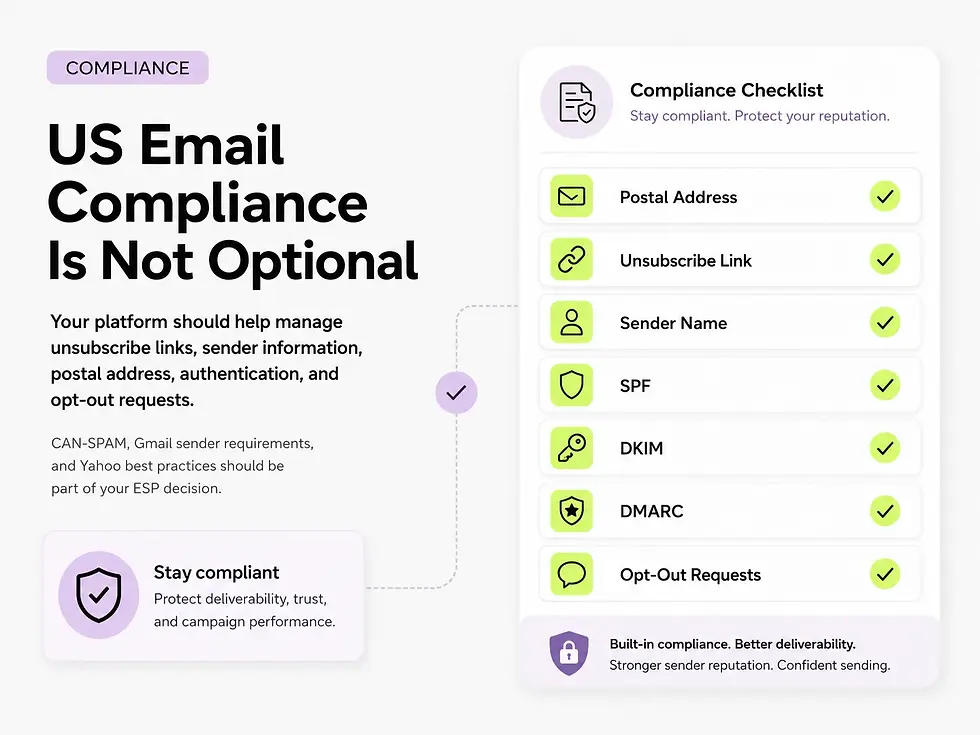
CAN-SPAM Requirements for Businesses
Your marketing emails should use accurate header information, avoid deceptive subject lines, identify the message as an ad when required, include a valid physical postal address, include a clear unsubscribe mechanism, honor opt-out requests promptly, and monitor what agencies or vendors send on your behalf.
A reputable ESP should make compliance easier by automatically including unsubscribe links, managing opt-outs, and allowing you to add a business address to the footer.
However, the platform does not remove your responsibility. Your business is still responsible for the emails sent under your brand.
Compliance Checklist
Requirement | Why It Matters |
Physical mailing address | Required for commercial emails |
Clear unsubscribe link | Required for opt-out compliance |
Accurate sender name | Protects trust and legal compliance |
Honest subject line | Avoids misleading claims |
Opt-out management | Prevents sending to unsubscribed contacts |
SPF, DKIM, DMARC | Helps authentication and deliverability |
List hygiene | Reduces spam complaints and bounce rates |
Preference center | Helps users choose what they want to receive |
For US businesses, compliance should be part of your ESP decision, not something you fix later.
4. Real Pricing at Scale
Many platforms look affordable when your list is small.
The question is what happens when your list grows.
A platform that costs $20 per month at 1,000 contacts may cost several hundred dollars per month at 50,000 or 100,000 contacts.
When comparing pricing, check contact-based pricing, send-volume pricing, whether unsubscribed contacts count, SMS pricing, automation limits, user seat limits, reporting upgrades, CRM features, support level, dedicated IP costs, and migration costs.
Planning Example: List Growth Cost
List Size | Low-Cost Platform Range | Mid-Market Platform Range | Advanced Platform Range |
1,000 contacts | $0 to $30/month | $20 to $60/month | $50 to $100/month |
10,000 contacts | $30 to $100/month | $80 to $200/month | $150 to $350/month |
50,000 contacts | $100 to $300/month | $250 to $600/month | $400 to $1,000+/month |
100,000 contacts | $200 to $600/month | $500 to $1,200/month | $800 to $2,000+/month |
These are planning ranges, not official prices. Always check current pricing before making a final platform decision.
Platform pricing is only one part of the total email marketing budget. If you want a deeper breakdown of platform fees, setup, strategy, copywriting, design, and monthly management, read our full guide on how much email marketing costs in the US.
Example: Hidden Cost of Unsubscribed Contacts
Imagine you have 100,000 total contacts, 70,000 active subscribers, and 30,000 unsubscribed or inactive contacts.
If a platform bills based on all stored contacts, you may pay for 100,000 contacts.
If another platform bills closer to active contacts or send volume, your cost may be lower.
Even a $250 monthly difference equals:
$250 x 12 = $3,000 per year
For a growing business, pricing structure matters as much as the starting plan.

5. Automation Capabilities
Email automation is where the biggest revenue opportunities usually appear.
Most businesses do not need hundreds of flows. But they do need the right flows.
Basic Automation Needs
A small business may need a welcome series, newsletter campaigns, a basic re-engagement flow, simple promotional emails, and review request emails.
Ecommerce Automation Needs
An ecommerce brand may need a welcome flow, abandoned cart flow, browse abandonment flow, post-purchase flow, cross-sell flow, VIP customer flow, winback flow, birthday or anniversary flow, back-in-stock emails, and product recommendation emails.
B2B and SaaS Automation Needs
A B2B or SaaS company may need a lead nurturing flow, demo request follow-up, trial onboarding, webinar registration flow, sales-qualified lead alerts, cold lead reactivation, customer onboarding, renewal reminders, and upsell campaigns.
Automation Revenue Example
For an ecommerce store generating $100,000 per month, email may reasonably support 15% to 30% of revenue when campaigns and flows are properly built.

That means:
Email Revenue Share | Monthly Email Revenue | Annual Email Revenue |
15% | $15,000 | $180,000 |
20% | $20,000 | $240,000 |
30% | $30,000 | $360,000 |
If your ESP does not support the flows that drive this revenue, the platform may be limiting your growth.
If you are not sure which flows your store actually needs, we recommend starting with the basics: welcome series, cart recovery, post-purchase emails, browse recovery, product suggestion emails, and re-engagement campaigns. We explain these in more detail in our ecommerce automation guide: Top 10 Automated Email Flows Every E-commerce Brand Needs.
6. Integration Quality
Your ESP should connect with the tools your business already uses.
A platform may look great in a demo, but if it does not integrate with your website, CRM, booking system, ecommerce store, payment provider, or analytics tools, your team may need manual workarounds.
Ecommerce Integrations to Check
For ecommerce businesses, check integrations with Shopify, WooCommerce, BigCommerce, Magento, Stripe, Recharge, Yotpo, Judge.me, Google Analytics, Meta Ads, and Google Ads.
B2B and SaaS Integrations to Check
For B2B and SaaS companies, check integrations with HubSpot, Salesforce, Pipedrive, Calendly, Stripe, Segment, Google Analytics, Zapier, Make, and Typeform.
Service Business Integrations to Check
For service businesses, check integrations with booking systems, CRM tools, payment platforms, forms, review platforms, website builders, and Google Business Profile tools.
Native integrations are usually better than relying only on API access. If a platform requires a developer for every important connection, it may become more expensive than expected.
7. Reporting and Revenue Attribution
A good ESP should help you understand what email marketing is actually doing for your business.
Basic metrics include open rate, click rate, unsubscribe rate, bounce rate, and spam complaint rate.
But growth-focused businesses need more than that.
You should also track email revenue, revenue per recipient, flow revenue, campaign revenue, conversion rate, average order value from email, customer lifetime value, repeat purchase rate, segment performance, attribution window, top-performing products, and best-performing subject lines.
Simple Email ROI Formula
Use this formula:
Email ROI = Email Revenue ÷ Email Cost
Example:
Monthly email revenue: $20,000
Monthly platform cost: $300
Monthly email management cost: $2,000
Total monthly email cost: $2,300
Email ROI: $20,000 ÷ $2,300 = 8.7x
That means every $1 spent on email marketing returns approximately $8.70 in revenue.
This is simplified and does not include margin, but it is a useful starting point.
8. Ease of Use and Team Capacity
The best platform on paper may not be the best platform for your team.
Before choosing an ESP, ask who will build the emails, who will write the copy, who will set up automations, who will check reports, who will troubleshoot deliverability, who will manage segmentation, and who will handle testing.
If your team is small, you may need a simpler tool. If your team has an email specialist or agency support, a more advanced platform can make sense.
Team Capacity Matrix
Team Situation | Better Platform Type |
Founder manages emails alone | Simple newsletter or beginner-friendly ESP |
Small marketing team | Mid-level ESP with templates and automation |
Ecommerce brand with monthly campaigns | Ecommerce-focused ESP |
Dedicated email marketer | Advanced automation platform |
Agency support | Platform selected by business model and growth goals |
Sales and marketing team | CRM-integrated platform |
Do not choose a complex platform if nobody has time to use it properly.
9. Migration and Scalability
Many businesses choose a beginner platform, then outgrow it.
Migration is possible, but it requires planning.
You may need to move contacts, segments, tags, forms, templates, automations, suppression lists, unsubscribe data, purchase history, custom fields, and reporting logic.
A poor migration can damage deliverability, lose customer data, break automations, or create compliance issues.
Typical Migration Timeline
Migration Type | Estimated Timeline |
Simple newsletter platform migration | 1 to 2 weeks |
Ecommerce ESP migration | 3 to 6 weeks |
CRM and email automation migration | 4 to 8 weeks |
Large multi-brand migration | 6 to 12 weeks |
If you expect fast growth, choose a platform you can use for at least the next 18 to 24 months.
Best Email Marketing Platforms by Business Type
There is no single best email marketing platform for every business.
Below is a practical comparison based on business model.

Best ESP Platforms for Ecommerce and DTC Brands
Klaviyo
Klaviyo is one of the strongest email marketing platforms for ecommerce brands, especially Shopify stores.
It is designed around customer behavior, product data, purchase history, segmentation, and revenue attribution.
Best For
Klaviyo is best for Shopify stores, fashion brands, beauty brands, luxury ecommerce, high-volume DTC brands, brands with repeat purchase potential, and businesses that rely on abandoned cart and post-purchase revenue.
Strongest Features
Klaviyo’s strongest features include deep Shopify integration, advanced segmentation, abandoned cart flows, browse abandonment flows, product recommendations, revenue attribution, customer lifetime value data, dynamic content, and predictive analytics.
Planning Cost Range
Small list: around $20 to $100/monthGrowing ecommerce list: around $100 to $400/monthLarge list: $500+/month depending on contacts and sending volume
Always check current pricing before choosing a plan.
When Klaviyo Makes Sense
Klaviyo makes sense when your ecommerce brand has enough traffic, orders, and customer data to benefit from advanced automation.
If your store generates $50,000 per month and email can help drive 20% of revenue, the channel may be worth: $50,000 x 20% = $10,000/month
In that scenario, spending $100 to $300 per month on the right ESP may be reasonable if the platform supports strong flows and segmentation.
Potential Drawbacks
Potential drawbacks include higher cost as the list grows, strategic setup requirements, more complexity than beginner platforms, and limited value for very small stores that do not yet need advanced ecommerce automation.
Omnisend
Omnisend is a strong option for ecommerce brands that want email, SMS, and push notifications in one system.
It is often easier to use than more complex enterprise platforms, while still offering ecommerce-focused automation.
Best For
Omnisend is best for mid-size ecommerce brands, seasonal businesses, flower shops, gift brands, fashion and beauty stores, and businesses that want SMS and email together.
Strongest Features
Omnisend’s strongest features include email and SMS campaigns, visual automation builder, abandoned cart flows, seasonal campaigns, Shopify integration, product blocks, and simple ecommerce reporting.
Planning Cost Range
Small list: around $20 to $75/month
Mid-size list: around $75 to $300/month
SMS costs: additional and dependent on volume
When Omnisend Makes Sense
Omnisend is a good fit when a business wants ecommerce automation but does not want to manage a more complex platform.
For example, a flower delivery brand may use Omnisend for Valentine’s Day campaigns, Mother’s Day campaigns, birthday reminder campaigns, abandoned cart SMS, post-purchase review requests, and seasonal winback emails.
Potential Drawbacks
Potential drawbacks include growing SMS costs, less advanced ecommerce segmentation than Klaviyo, and weaker fit for complex B2B workflows.
Brevo
Brevo can be a practical choice for startups and budget-conscious businesses that need email and SMS without a high monthly cost.
Best For
Brevo is best for startups, budget-conscious ecommerce, small service businesses, simple email and SMS campaigns, and businesses with basic automation needs.
Strongest Features
Brevo’s strongest features include affordable starting plans, email and SMS options, basic CRM features, simple automation, and transactional email options.
Planning Cost Range
Starter use: free to low-cost plans
Growing use: around $20 to $150/month
High-volume use: depends on send volume and features
When Brevo Makes Sense
Brevo makes sense when budget is important and the business does not need advanced ecommerce segmentation or complex lifecycle automation.
Potential Drawbacks
Potential drawbacks include a less polished interface, weaker ecommerce specialization compared with Klaviyo or Omnisend, limited advanced automation, and deliverability that depends heavily on setup and list quality.
For ecommerce brands, the platform matters most when it can support revenue-driving flows. If you want to see which automations should be built first, read our guide on the top automated email flows every ecommerce brand needs.
Best ESP Platforms for SaaS and B2B Companies
ActiveCampaign
ActiveCampaign is a strong platform for automation-heavy businesses, especially SaaS, B2B, and service companies with longer sales cycles.
Best For
ActiveCampaign is best for SaaS companies, B2B lead nurturing, sales teams, consulting businesses, companies with complex funnels, and businesses that need CRM and email together.
Strongest Features
ActiveCampaign’s strongest features include advanced automation, lead scoring, CRM features, sales pipeline automation, conditional logic, behavior-based triggers, dynamic content, and detailed segmentation.
Planning Cost Range
Small team: around $30 to $100/month
Growing team: around $100 to $400/month
Advanced use: $500+/month depending on contacts and features
When ActiveCampaign Makes Sense
ActiveCampaign makes sense when your customer journey is longer than one purchase.
For example, a SaaS company may need lead magnet follow-up, demo booking sequence, trial onboarding, product education emails, sales team alerts, renewal reminders, and upsell campaigns.
If your sales cycle lasts 30 to 90 days, automation quality can directly affect conversion.
Potential Drawbacks
Potential drawbacks include a learning curve, careful setup requirements, too much complexity for simple newsletters, and weaker ecommerce-native functionality than Klaviyo.

HubSpot
HubSpot is more than an ESP. It is a CRM, marketing, sales, and customer service ecosystem.
Best For
HubSpot is best for B2B companies, SaaS companies, sales-driven organizations, companies needing CRM and marketing alignment, larger teams, and businesses that want all-in-one reporting.
Strongest Features
HubSpot’s strongest features include CRM integration, email marketing, forms and landing pages, lead tracking, sales pipeline, campaign reporting, team collaboration, and automation.
Planning Cost Range
Basic use: free to lower-cost starter plans
Growing team: hundreds per month
Professional use: often $800+/month depending on hub and features
Enterprise use: significantly higher
When HubSpot Makes Sense
HubSpot makes sense when a business wants one system for marketing, sales, and CRM.
It may be overkill if you only need email campaigns.
Potential Drawbacks
Potential drawbacks include higher cost at advanced tiers, complex pricing, weaker fit for email-only needs, and longer setup time.
Moosend
Moosend can be a good option for startups and small B2B teams that need automation without the cost of larger systems.
Best For
Moosend is best for SaaS startups, B2B startups, newsletter plus automation, budget-conscious teams, and simple lead nurturing.
Strongest Features
Moosend’s strongest features include affordable automation, visual workflow builder, newsletter campaigns, basic segmentation, and simple reporting.
Planning Cost Range
Small use: around $10 to $50/monthGrowing list: around $50 to $200/monthLarger list: depends on volume and plan
Potential Drawbacks
Potential drawbacks include a smaller ecosystem, fewer integrations than larger platforms, and weaker fit for enterprise workflows.
Best ESP Platforms for Small Businesses
Mailchimp
Mailchimp is one of the most recognized email marketing platforms. It can work well for beginners and small businesses with simple needs.
Best For
Mailchimp is best for beginners, small lists, newsletters, nonprofits, basic campaigns, and teams that want templates and simplicity.
Strongest Features
Mailchimp’s strongest features include an easy campaign builder, many templates, strong brand recognition, common integrations, and a beginner-friendly interface.
Planning Cost Range
Small list: free to low-cost plansGrowing list: can increase quicklyLarger lists: may become expensive depending on contact count and features
When Mailchimp Makes Sense
Mailchimp makes sense if your business mainly sends newsletters and does not need advanced automation.
Potential Drawbacks
Potential drawbacks include higher costs as your list grows, limited automation compared with advanced tools, weaker fit for ecommerce brands that need deep customer data, and a pricing structure that should be reviewed carefully.
Sender
Sender is a good starting point for businesses that want affordable email marketing and simple campaigns.
Best For
Sender is best for early-stage businesses, small ecommerce stores, side projects, simple newsletters, and budget-conscious teams.
Strongest Features
Sender’s strongest features include low-cost plans, simple campaign builder, basic automation, and easy setup.
Planning Cost Range
Small use: free or low-costGrowing use: around $10 to $100/monthLarger use: depends on list size and plan
Potential Drawbacks
Potential drawbacks include fewer advanced features, a smaller integration ecosystem, and weaker fit for complex ecommerce or CRM workflows.
MailerLite
MailerLite is another practical option for small businesses, creators, and newsletter-focused brands.
Best For
MailerLite is best for creators, small businesses, service providers, simple newsletters, landing pages, and lead magnets.
Strongest Features
MailerLite’s strongest features include a clean interface, newsletter campaigns, landing pages, forms, simple automation, and affordable pricing.
Potential Drawbacks
Potential drawbacks include less ecommerce depth, limited complex automation, and weaker fit for larger teams.
Email Marketing Platform Comparison Table
Platform | Best For | Main Strength | Best Business Type | Watch Out For |
Klaviyo | Ecommerce and Shopify | Advanced ecommerce automation | DTC, fashion, beauty, luxury | Higher cost as list grows |
Omnisend | Ecommerce + SMS | Email, SMS, and push | Seasonal ecommerce, gifts, flowers | SMS costs can increase |
ActiveCampaign | Automation and CRM | Lead nurturing and workflows | SaaS, B2B, service businesses | Learning curve |
HubSpot | All-in-one CRM and marketing | Sales and marketing alignment | B2B and SaaS | Higher cost |
Brevo | Budget email and SMS | Affordable sending | Startups, small businesses | Less advanced automation |
Mailchimp | Beginner email marketing | Familiar interface | Small businesses, nonprofits | Can become expensive |
Sender | Low-cost email marketing | Simple campaigns | Small businesses, early-stage brands | Fewer advanced features |
MailerLite | Newsletters and creators | Easy content campaigns | Creators, service businesses | Less ecommerce depth |
Moosend | Affordable automation | Visual workflows | SaaS startups, B2B startups | Smaller ecosystem |

Real Cost Scenarios
Scenario 1: Small Ecommerce Store
Business profile: monthly revenue of $30,000, email list of 15,000 contacts, 2 to 4 campaigns per month, core flows including welcome, abandoned cart, post-purchase, and winback, and a founder or small marketing team managing the channel.
Estimated Platform Cost
Platform Type | Monthly Planning Range | Annual Planning Range |
Budget ESP | $30 to $100 | $360 to $1,200 |
Ecommerce ESP | $75 to $200 | $900 to $2,400 |
Advanced ESP | $150 to $350 | $1,800 to $4,200 |
Revenue Logic
If email generates 15% of monthly revenue:
$30,000 x 15% = $4,500/month from email
Annual email revenue:
$4,500 x 12 = $54,000/year
If the right platform and flows improve email revenue by 20%:
$54,000 x 20% = $10,800 additional annual revenue
In this case, paying an extra $1,000 to $2,000 per year for a stronger ESP may be justified if the platform supports better automation and segmentation.
Best Fit
Best-fit options include Omnisend for simple ecommerce plus SMS, Klaviyo if Shopify data and advanced flows matter, and Brevo or Sender if budget is the main concern.
Scenario 2: Growing Shopify Brand
Business profile: monthly revenue of $150,000, email list of 50,000 contacts, weekly campaigns, core flows including welcome, abandoned cart, browse abandonment, post-purchase, VIP, and winback, and a marketing manager or agency support.
Estimated Platform Cost
Platform Type | Monthly Planning Range | Annual Planning Range |
Budget ESP | $150 to $300 | $1,800 to $3,600 |
Ecommerce ESP | $250 to $700 | $3,000 to $8,400 |
Advanced Setup with SMS | $500 to $1,500 | $6,000 to $18,000 |
Revenue Logic
If email generates 20% of monthly revenue:
$150,000 x 20% = $30,000/month from email
Annual email revenue:
$30,000 x 12 = $360,000/year
If better segmentation and flows increase email revenue by 15%:
$360,000 x 15% = $54,000 additional annual revenue
For a brand at this level, choosing a stronger ecommerce ESP can be a revenue decision, not just a software expense.
Best Fit
Best-fit options include Klaviyo for advanced ecommerce growth, Omnisend if email and SMS simplicity matter, and ActiveCampaign only if CRM logic is more important than ecommerce depth.
Scenario 3: SaaS Company
Business profile: annual recurring revenue of $500,000, email list of 40,000 contacts, sales cycle of 30 to 90 days, core flows including lead nurture, trial onboarding, demo follow-up, reactivation, and upsell, and a marketing plus sales team.
Estimated Platform Cost
Platform Type | Monthly Planning Range | Annual Planning Range |
Basic ESP | $100 to $250 | $1,200 to $3,000 |
Automation ESP | $250 to $700 | $3,000 to $8,400 |
CRM Suite | $800 to $2,000+ | $9,600 to $24,000+ |
Revenue Logic
If email and lifecycle automation influence 10% of ARR:
$500,000 x 10% = $50,000 influenced revenue
If better lead nurturing improves conversion by only 10%:
$50,000 x 10% = $5,000 additional annual revenue
But for SaaS, the real upside often comes from shorter sales cycles, higher trial activation, better demo show-up rates, more upsells, lower churn, and better renewal communication.
Best Fit
Best-fit options include ActiveCampaign for advanced automation, HubSpot for CRM and sales alignment, and Moosend for budget-conscious SaaS startups.
Scenario 4: Local Service Business
Business profile: monthly revenue of $40,000, email list of 5,000 contacts, 2 campaigns per month, core flows including review request, reactivation, seasonal promotions, and appointment follow-up, and an owner or small team managing marketing.
Estimated Platform Cost
Platform Type | Monthly Planning Range | Annual Planning Range |
Simple ESP | $15 to $75 | $180 to $900 |
Mid-Level ESP | $75 to $200 | $900 to $2,400 |
CRM-Integrated ESP | $150 to $500 | $1,800 to $6,000 |
Revenue Logic
If reactivation emails bring back only 10 customers per month and the average order value is $150:
10 x $150 = $1,500/month
Annual reactivation revenue:
$1,500 x 12 = $18,000/year
For service businesses, email does not need to be complicated to be profitable. It needs to be consistent and relevant.
Best Fit
Best-fit options include MailerLite for simple newsletters, Brevo for affordable email and SMS, Mailchimp for beginner-friendly campaigns, and ActiveCampaign if CRM automation is needed.
Best ESP by Business Goal
If You Want More Ecommerce Revenue
Choose Klaviyo or Omnisend.
Focus on abandoned cart recovery, browse abandonment, post-purchase upsell, VIP customer campaigns, customer winback, and product recommendations.
If You Want Better Lead Nurturing
Choose ActiveCampaign or HubSpot.
Focus on lead scoring, CRM integration, demo follow-up, sales pipeline triggers, behavior-based emails, and long-form nurturing sequences.
If You Want a Low-Cost Start
Choose Sender, Brevo, or MailerLite.
Focus on clean list building, welcome email, newsletter consistency, basic segmentation, and simple automation.
If You Want Email + SMS
Choose Omnisend or Brevo.
Focus on campaign timing, SMS cost control, abandoned cart SMS, seasonal promotions, and consent management.
If You Want Sales and Marketing in One System
Choose HubSpot.
Focus on CRM visibility, sales follow-up, landing pages, forms, reporting, and pipeline attribution.

5 Biggest Mistakes When Choosing an ESP
Mistake 1: Choosing Based Only on Monthly Price
A cheaper ESP is not always cheaper in practice.
If the platform does not support the flows your business needs, you may lose more in missed revenue than you save in subscription fees.
Better Question
Instead of asking “What is the cheapest platform?”, ask “What platform gives us the best revenue potential for the cost?”
Mistake 2: Ignoring Deliverability
Deliverability affects revenue, trust, and customer communication.
If your emails are not authenticated properly or your list quality is poor, your campaigns may not reach the inbox.
Better Question
Ask whether this platform helps you set up SPF, DKIM, DMARC, bounce management, unsubscribe handling, and list hygiene.
Mistake 3: Overpaying for Features You Will Not Use
Some businesses choose a complex platform because it looks impressive.
But if your team only sends two newsletters per month, you may not need advanced predictive analytics, multi-branch automation, or enterprise CRM features.
Better Question
Ask what features your team will actually use in the next 6 to 12 months.
Mistake 4: Choosing a Platform That Cannot Grow
A beginner platform may be fine today but limiting in one year.
Check pricing and features at 10,000 contacts, 25,000 contacts, 50,000 contacts, and 100,000 contacts.
Better Question
Ask whether this ESP will still make sense when your list doubles.
Mistake 5: Not Testing the Automation Builder
Almost every platform says it offers automation.
But automation quality varies a lot.
Before choosing, test one real flow, such as abandoned cart, welcome series, demo follow-up, post-purchase sequence, or winback flow.
Better Question
Ask whether your team can actually build and manage this automation without constant technical support.

Email Platform Setup Timeline
Choosing the platform is only the beginning.
A proper email marketing setup includes strategy, technical configuration, templates, segmentation, automation, testing, and reporting.
Basic Setup Timeline
Task | Estimated Time |
ESP selection | 2 to 5 days |
Account setup | 1 day |
Domain authentication | 1 to 3 days |
Template design | 3 to 7 days |
Basic segmentation | 1 to 3 days |
Welcome flow setup | 2 to 5 days |
First campaign setup | 1 to 3 days |
Typical basic setup: 1 to 2 weeks.
Ecommerce Setup Timeline
Task | Estimated Time |
ESP selection | 3 to 7 days |
Shopify or WooCommerce integration | 1 to 3 days |
Domain authentication | 1 to 3 days |
Template design | 5 to 10 days |
Core flow strategy | 3 to 7 days |
Flow setup | 2 to 4 weeks |
Testing and QA | 3 to 7 days |
Reporting setup | 2 to 5 days |
Typical ecommerce setup: 3 to 6 weeks.
Full Migration Timeline
Task | Estimated Time |
Audit current platform | 2 to 5 days |
Export contacts and segments | 1 to 3 days |
Clean list | 2 to 7 days |
Rebuild templates | 5 to 10 days |
Rebuild automations | 2 to 4 weeks |
Set up authentication | 1 to 3 days |
Test deliverability | 3 to 7 days |
Launch and monitor | 1 to 2 weeks |
Typical migration: 4 to 8 weeks.
Email Marketing Platform Decision Tree
Step 1: What Type of Business Do You Have?
If you have an ecommerce business, start with Klaviyo or Omnisend.
If you have a SaaS or B2B company, start with ActiveCampaign or HubSpot.
If you have a local service business, start with MailerLite, Brevo, Mailchimp, or ActiveCampaign.
If you have a creator or newsletter business, start with MailerLite, ConvertKit, beehiiv, or Sender.
If you have an agency, look for multi-account management, permissions, and reporting.
Step 2: What Is Your Monthly Revenue?
Monthly Revenue | Recommended ESP Level |
Under $10,000 | Simple low-cost ESP |
$10,000 to $50,000 | Affordable ESP with basic automation |
$50,000 to $200,000 | Specialized ESP based on business model |
$200,000+ | Advanced ESP with strong automation and reporting |
Step 3: How Many Contacts Do You Have?
Contact Count | What to Watch |
Under 5,000 | Free or starter plans may work |
5,000 to 25,000 | Check automation and pricing tiers |
25,000 to 100,000 | Pricing structure becomes important |
100,000+ | Deliverability, segmentation, and billing model matter a lot |
Step 4: What Automations Do You Need?
Automation Need | Suggested Platform Type |
Newsletters only | Simple ESP |
Ecommerce flows | Klaviyo or Omnisend |
SMS + email | Omnisend or Brevo |
Lead nurturing | ActiveCampaign or HubSpot |
CRM workflows | HubSpot or ActiveCampaign |
Budget automation | Moosend, Brevo, MailerLite |
USA Email Compliance and Deliverability Checklist
Before sending marketing emails in the USA, make sure your ESP setup includes SPF authentication, DKIM authentication, DMARC policy, valid sender domain, business postal address, unsubscribe link, suppression list management, accurate sender name, non-deceptive subject lines, bounce monitoring, spam complaint monitoring, list cleaning process, permission-based list growth, and a preference center when possible.
Gmail and Yahoo Requirements
Google requires email authentication for senders, and bulk senders need SPF, DKIM, and DMARC. Authenticated messages are less likely to be rejected or marked as spam by Gmail.
Yahoo recommends authenticating email with SPF and DKIM, supporting easy unsubscribe, keeping complaint rates low, and maintaining valid DNS practices.
This means your ESP choice should support modern sender requirements, not just campaign design.
How Lumilinx Helps Businesses Choose and Set Up the Right ESP
Choosing an ESP is not just about software.
The real value comes from how the platform is configured.
At Lumilinx, we help businesses choose, migrate, set up, and optimize email marketing platforms based on their business model, list size, revenue goals, and internal capacity.
We analyze your current ESP setup, monthly software cost, hidden platform costs, contact list structure, deliverability setup, SPF, DKIM, and DMARC, campaign performance, automation gaps, segmentation quality, revenue attribution, Shopify, WooCommerce, CRM, or website integrations, compliance risks, and growth limitations.

What Lumilinx Can Help With
Lumilinx can help you choose the right email marketing platform, compare ESP pricing and features, migrate from one platform to another, set up SPF, DKIM, and DMARC, build email templates, create automated flows, segment your audience, connect Shopify, WooCommerce, CRM, or booking tools, improve deliverability, optimize email campaigns, track revenue and conversions, create monthly campaign calendars, and manage ongoing email marketing.
FAQ
What is an ESP in email marketing?
An ESP, or Email Service Provider, is a platform that helps businesses send marketing emails, manage subscribers, build automations, segment audiences, and track performance. Examples include Klaviyo, Mailchimp, ActiveCampaign, Omnisend, Brevo, HubSpot, and MailerLite.
What is the best email marketing platform for small business?
The best email marketing platform for a small business depends on the business model. MailerLite, Sender, Brevo, and Mailchimp can work well for simple newsletters. ActiveCampaign may be better if the business needs CRM automation. Klaviyo or Omnisend may be better for ecommerce.
What is the best ESP for Shopify?
Klaviyo is one of the strongest ESP options for Shopify brands because it offers deep ecommerce integration, customer segmentation, product recommendations, abandoned cart flows, and revenue attribution. Omnisend is also a strong option, especially for brands that want email and SMS together.
Is Klaviyo better than Mailchimp?
Klaviyo is usually better for ecommerce brands that need advanced Shopify integration, customer segmentation, abandoned cart flows, and revenue tracking. Mailchimp can still work for beginners, newsletters, nonprofits, and small businesses with simple email needs.
Is ActiveCampaign better than Klaviyo?
ActiveCampaign is often better for SaaS, B2B, lead nurturing, CRM workflows, and complex sales funnels. Klaviyo is usually better for ecommerce and Shopify brands. The better choice depends on your business model.
How much does an email marketing platform cost?
A small business may start with a free or low-cost plan. Growing businesses often pay $50 to $500 per month. Larger ecommerce, SaaS, or multi-brand companies may pay $500 to $2,000+ per month depending on contacts, send volume, SMS, automation, and reporting needs.
How much should a business budget for email marketing?
A simple ESP may cost under $100 per month. A more advanced email marketing program may include platform fees, template design, automation setup, copywriting, campaign management, and reporting. For growing businesses, total email marketing costs can range from a few hundred dollars to several thousand dollars per month depending on scope.
Can I switch email platforms later?
Yes, but migration should be planned carefully. You need to move contacts, segments, templates, automations, suppression lists, forms, and reporting logic. You also need to set up domain authentication and test deliverability before fully switching.
Do I need email automation?
Most businesses should have at least basic automation. A welcome series, abandoned cart flow, post-purchase follow-up, review request, and winback flow can help generate revenue without manually sending every message.
What should I check before choosing an ESP?
Check business model fit, deliverability support, SPF/DKIM/DMARC setup, pricing at scale, automation features, integrations, reporting, compliance tools, ease of use, support quality, and migration requirements.
What email platform is best for ecommerce?
For ecommerce, Klaviyo and Omnisend are usually strong options. Klaviyo is better for advanced ecommerce segmentation and automation. Omnisend is useful for brands that want email, SMS, and seasonal campaigns in one platform.
What email platform is best for B2B?
For B2B, ActiveCampaign and HubSpot are often strong options. ActiveCampaign is useful for advanced automation and lead nurturing. HubSpot is better for teams that want CRM, marketing, sales, and reporting in one ecosystem.
Is the cheapest email platform the best choice?
Not always. A cheaper platform may work for basic newsletters, but it may not support revenue-driving automation, strong integrations, or advanced segmentation. The best platform is the one that fits your business needs and growth stage.
Does email deliverability depend on the platform?
Partly. Deliverability depends on the platform, but also on your domain authentication, sender reputation, list quality, engagement, spam complaints, and sending practices. A strong ESP helps, but your strategy and setup matter too.
What are SPF, DKIM, and DMARC?
SPF, DKIM, and DMARC are email authentication protocols. They help mailbox providers verify that your emails are legitimate and protect your domain from spoofing or impersonation. They are important for deliverability and sender trust.
Final Recommendation
Do not choose your email marketing platform based only on price or popularity.
Choose it based on your business model, revenue stage, list size, automation needs, integrations, compliance requirements, team capacity, and growth plans.
A small business sending newsletters does not need the same ESP as a Shopify brand generating six figures per month. A SaaS company with a 90-day sales cycle does not need the same platform as a flower shop running seasonal promotions.
The right ESP should help you send better emails, build smarter automations, protect your deliverability, understand revenue, and scale without unnecessary complexity.
If you are not sure which email marketing platform fits your business, Lumilinx can help you compare options, calculate real costs, and choose the right setup before you invest months into the wrong system.


Comments