10 Email Marketing Mistakes Killing Your Revenue

Your email list should be driving more revenue than it is.
Many brands send campaigns every week and still see weak results. Not because email is broken. Because the strategy behind it is.
Small mistakes add up fast. Weak segmentation. Generic subject lines. Poor mobile experience. Low deliverability. Unclear CTAs. These issues quietly reduce opens, clicks, and sales.
This guide breaks down 10 email marketing mistakes that can hurt your ROI. More importantly, it shows you how to fix them.
By the end, you will know what may be holding your email performance back and where to start improving it.
Let’s dive in.
Quick Jump to Your Problem:
Poor List Segmentation → Revenue loss: 30-40%
Weak Subject Lines → Open rate drop: 45-65%
Ignoring Mobile Optimization → Conversion drop: 60%+
Sending from Generic Addresses → Trust drop: 25-35%
No Clear CTA or Multiple CTAs → Conversion loss: 70%
Ignoring Email Deliverability → 20-30% emails never reach inbox
Wrong Email Frequency → Unsubscribe spike or revenue plateau
Not Testing Before Sending → Quality damage + lost sales
Zero Personalization Beyond First Name → 2-3% CTR vs 15%+ personalized
No A/B Testing or Optimization → Flying blind with mediocre results
Mistake 1: Poor List Segmentation
The Problem
This is the 1 mistake we see, and it's costing you the most money.
Here's the scenario: You have a list of 50,000 people. Some are enterprise customers spending $50K/year. Some are trial users. Some haven't opened an email in 6 months. Some bought once in 2023.
Then you send the same email to all 50,000.
The trial user gets an email that assumes they're a power user. The enterprise customer gets content meant for someone starting out. The inactive person gets the same pitch as someone who bought last week.
The result? Everyone ignores it.
Segmentation is how email marketing actually works. Without it, you're not really doing email marketing, you're just sending messages into the void.

Why This Costs You Revenue
Irrelevant = Deleted: If an email isn't relevant to that specific person, they don't read it. Period.
Unsubscribe Spike: Generic emails cause 3-5x higher unsubscribe rates
List Decay: You train subscribers to ignore you, and even your good emails get ignored
Customer Lifetime Value Impact: A customer who never feels understood = lower repeat purchases
We analyzed customers who only fixed segmentation (no other changes): average CTR jumped from 1.2% to 3.8% (315% increase).
How to Fix It: 5-Step Segmentation Strategy
Step 1: Identify Your Segments (This Week)
Sit down and answer: Who are the different types of people on my list?
Examples:
By Role: Accountants vs Founders vs Marketing Managers
By Purchase History: Free trial users vs customers vs inactive customers
By Company Size: Solo founder vs 50-person company vs enterprise
By Engagement: Openers vs non-openers vs clickers
By Geography: Different countries, timezones, regions
By Product: Different product lines or features
Write down 4-6 main segments. Don't overthink it.
Step 2: Tag Your Subscribers (This Week + Ongoing)
For each new subscriber, tag them immediately:
"trial_user" vs "paying_customer"
"e-commerce" vs "saas" vs "service"
"cold_list" vs "warm_list"
Use your email platform's tagging system. Every major platform has this.
Step 3: Create Segment-Specific Messages (Week 2)
For your next campaign, create 3 versions:
Version A: For trial users (focus on getting them to use the product)
Version B: For paying customers (focus on advanced features, retention)
Version C: For inactive people (win-back, special offer, or preference update)
Send each version only to that segment.

Step 4: Measure the Difference (Ongoing)
Track open rates, click rates, and revenue by segment.
Example:
Trial users:     24% open rate, 2.1% CTR, $0 revenue
Customers:       31% open rate, 3.8% CTR, $2.15 revenue per email
Inactive:        8% open rate, 0.2% CTR, $0 revenue
Step 5: Create a Segment for Inactive Users (Critical)
Anyone who hasn't opened an email in 6 months is killing your sender reputation.
Action: Create a 3-email "win-back" sequence:
Email 1 (Day 1): "We miss you" + exclusive offer
Email 2 (Day 7): "Your account is about to close" (scarcity)
Email 3 (Day 14): "Last chance" + ask them to confirm interest
If they don't engage: Remove them.
Expected Results
Open Rate: +20-40% increase (content is relevant)
Click Rate: +50-150% increase
Revenue Per Email: +100-200% increase
List Health: Lower unsubscribe rates, better sender reputation
Timeline: See results in 2-3 campaigns (1-2 weeks)
Mistake 2: Weak Subject Lines
The Problem
Your email never even gets opened.
That's it. Game over before it started.
Subject lines are the only thing standing between your email and the spam folder (or, more likely, complete deletion).
The average subject line gets 2-3 seconds of attention. If it doesn't grab someone in that window, they move on.
Here are the weak subject lines we see constantly:
"Tips for getting started"
"Check out what's new"
"Your weekly update"
"Don't miss out"
"Learn more"
These are generic. They could be from anyone. They don't make the reader think "I need to open this."

Why This Costs You Revenue
Low Open Rate = Low Revenue: Simple math. 15% open rate = 85% of your list never sees your message
Sender Reputation: High delete rates (even before reading) tell email providers "this sender isn't wanted"
Wasted List: If you're sending to 50K people and only 7,500 open, the other 42,500 are essentially dead weight
Compare these two subject lines:
❌ Weak: "Monthly Marketing Tips"
✅ Strong: "How [Company] Increased Conversions 340% (Step-by-Step)"
The second one:
Uses a number (specific, credible)
Implies a process (step-by-step = actionable)
Creates curiosity gap (how exactly?)
Addresses a clear outcome (conversions increase)
How to Fix It: The Subject Line Formula
Formula: [Number/Question] + [Specific Outcome] + [Time/Benefit]
Examples:
"7 Hidden Reasons Your Emails Don't Convert (And How to Fix Them)"
"Is Your Email List Costing You $50K/Year?"
"How We Increased Reply Rates by 340% (In Just 30 Days)"
"Sarah, Your [Product] Usage is About to Expire"
The 3-Part Subject Line Checklist:
Specific, Not Generic
❌ "Check this out"
✅ "Your Q2 Revenue Report is Ready"
Creates Curiosity or Clear Value
❌ "Updates"
✅ "The #1 Reason Your Emails Get Spam Filtered (It's Not What You Think)"
Includes Personalization If Possible
❌ "New Product Launch"
✅ "Sarah, We Built This Feature Just for You"
A/B Testing Subject Lines (Required, Not Optional):
Test ONE variable per campaign:
Test 1: Number vs Question
A: "10 Email Mistakes Killing Your Revenue"
B: "Are Your Emails Leaving Money on the Table?"
Test 2: Personalization vs Curiosity Gap
A: "John, Your Custom Report is Ready"
B: "The One Metric 92% of Marketers Ignore (That Costs Thousands)"
Test 3: Benefit vs Urgency
A: "How to 3X Your Email Revenue This Month"
B: "Last Chance: 40% Off Email Audit (Ends Tonight)"
Pro Tip: Avoid these spam trigger words:
"Free" (if selling)
"Act now" / "Limited time" (overused)
All caps
Excessive punctuation (!!!)
Too many emojis
Expected Results
Open Rate: +15-45% increase (test winning subject line, then use it again)
Click Rate: +20-50% (people who open are more qualified)
Unsubscribe Rate: Stays the same or decreases (because wrong audience isn't opening)
Revenue Impact: Direct correlation to open rate increases
Timeline: Improvement visible in next campaign
Mistake 3: Ignoring Mobile Optimization
The Problem
50-65% of emails are opened on mobile devices.
Your email template is probably optimized for desktop.
That means half your readers are experiencing your email broken, unreadable, or with huge buttons that are impossible to tap.
Here's what broken mobile experience looks like:
Text that requires horizontal scrolling to read
Images that don't load or are massive
Buttons so small you need a stylus to click
"View in Browser" link is the most prominent element
3-column layout squished into a phone screen
The result: People see it's broken → they delete it → unsubscribe.

Why This Costs You Revenue
60%+ Abandonment Rate on Mobile: If email breaks on mobile, 60% of mobile users just leave
Low Click-Through Rates: Even if they stay, buttons are hard to click
Bounces: Poor mobile experience counts as "abuse" to some email providers
Sender Reputation: High deletion rates = your future emails land in spam
A mobile-optimized email will have:
2-3x higher CTR than non-optimized
2x higher conversion rate on mobile devices
40% fewer unsubscribes (people aren't frustrated)
How to Fix It: Mobile-First Email Design
Step 1: Use a Single-Column Layout
Multiple columns look nice on desktop but are unreadable on mobile.
Instead:
One column, full width
Images scale down naturally
Text is always readable
Everything stacks vertically
Step 2: Make Buttons Tap-Friendly
Button Size: Minimum 48x48 pixels (mobile touch target)
Padding: At least 20px around each button
Button Text: "Download Now" not "Click Here"
❌ Bad:
[Download] (button is 30x30px)✅ Good:
[Download Our Free Guide] (button is 200x50px with breathing room)Step 3: Font Sizes
Body Text: Minimum 14px
Headlines: 20-24px
CTA Text: 16px minimum
On mobile, 12px is unreadable. People have to pinch-zoom. They don't.
Step 4: Images
Width: Maximum 600px (fits most mobile screens)
Format: JPG or PNG, optimized (under 200KB ideally)
Alt Text: Always include (for accessibility + spam scoring)
❌ Bad approach: 1200px wide image squished down
✅ Good approach: 600px wide image that scales perfectly
Step 5: CTA Above the Fold
"Above the fold" means what you see without scrolling.
On mobile, that's about 200-300px from the top.
Your primary CTA button should appear within the first 3 sections of the email. Not at the bottom.
Step 6: Test on Real Devices
Don't just preview in your email client.
Test on:
iPhone (latest + 1 gen back)
Android phone
Tablet
Gmail app, Apple Mail, Outlook app
Most email platforms have preview tools. Use them.
Expected Results
Click-Through Rate: +150-200% increase on mobile
Conversion Rate: +80-120% increase
Mobile Open Rates: Stay high (no longer losing people to broken design)
Unsubscribe Rate: Decrease (less frustration)
Timeline: Improvement in next campaign
Mistake 4: Sending from "noreply" or Generic Addresses
The Problem
Your email arrives with a sender name like "noreply@company.com" or "Automated Message" or "Newsletter Team."
It feels like spam. It is spam behavior.
People don't reply to noreply addresses. They don't trust them. Subconsciously, they know this is a mass email, not a message from a human.
Compare:
❌ From: "noreply@company.com"
✅ From: "Sarah, CEO at Company sarah@company.com"
Which one feels like a real person you could actually talk to?

Why This Costs You Revenue
Lower Trust: People open emails from people they recognize, not robots
Lower Open Rates: 15-25% average vs 30-40% for personal senders
Higher Spam Complaints: Generic-looking senders get flagged as spam
No Reply Path: Even if someone wants to respond, they can't
Email providers are starting to favor "personalized" senders (real people with bios) over corporate bulk accounts.
How to Fix It: 4 Simple Changes
Step 1: Send from a Real Person
From: "John Smith, CEO" john@company.com
From: "Sarah, Product Manager" sarah@company.com
From: "Support Team" support@company.com
Not:
From: "noreply@company.com"
From: "Newsletter"
From: "Automated Message"
Step 2: Use Display Names Strategically
If you have a team of 5 people, rotate who sends:
Monday: From John (Founder)
Wednesday: From Sarah (Head of Product)
Friday: From Mike (Customer Success)
This builds relationships. People recognize names. They start opening more emails from specific people.
Step 3: Add a Reply-To Address
Even if you send from john@company.com, set reply-to as support@company.com or hello@company.com
This way:
Email comes from a person (higher trust)
Replies go to a monitored mailbox
You don't get 50K replies to john@personal-email.com
Step 4: Include an Avatar/Photo
Modern email clients can display sender photos.
Add your team member's photo to the sender profile (if your email platform supports it).
Visual cue = "this is from a real human" = more opens.
Expected Results
Open Rate: +15-30% increase (human touch)
Reply Rate: Increases significantly (people feel they can talk to you)
Deliverability: Slight improvement (less spam flagging)
Unsubscribe Rate: Decreases (higher trust = less wanting to leave)
Timeline: Immediate improvement
Mistake 5: No Clear CTA or Multiple Conflicting CTAs
The Problem
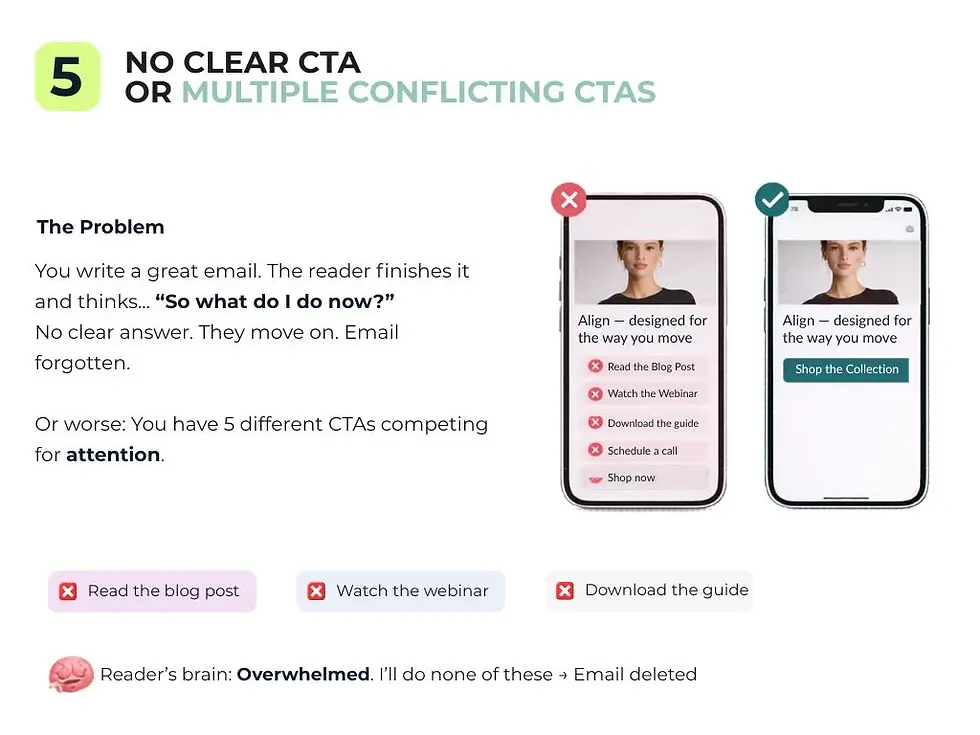
You write a great email. The reader finishes it and thinks... "So what do I do now?"
No clear answer. They move on. Email forgotten.
Or worse: You have 5 different CTAs competing for attention.
"Read the blog post" / "Watch the webinar" / "Download the guide" / "Schedule a call" / "Shop now"
Reader's brain: Overwhelmed. I'll do none of these. → Email deleted.
The rule: One primary CTA per email.
Why This Costs You Revenue
Decision Paralysis: Multiple options = no choice = no action
Weak Conversion: 70%+ of emails with unclear CTAs convert to nothing
Wasted Email: You spent time and list space for zero return
A single, clear CTA can increase conversions by 40-150% compared to multiple CTAs.
How to Fix It: The CTA Formula
Step 1: Define One Primary Goal
Before writing, ask: "What do I want the reader to DO?"
Schedule a call
Download a guide
Make a purchase
Read an article
Join a webinar
Pick ONE.
Step 2: Make the CTA a Visual Button (Not a Link)
❌ Weak: "Click here to download the guide"
✅ Strong: [ Download Your Free Guide ] ← Button
Buttons get 20-30% more clicks than text links.
Step 3: Use Action-Oriented, Benefit-Driven Copy
❌ "Learn More"✅ "Get Your Free Audit"
❌ "Click Here"✅ "See Your Revenue Potential"
❌ "Submit"✅ "Claim Your $50 Credit"
The button should answer: "What will happen when I click?"
Step 4: Repeat the CTA (At Least Twice)
Once in the body (after your main message)
Once in the footer (after the sign-off)
Don't feel bad about repetition. Studies show people need to see a CTA 3+ times before acting.

Step 5: Make It Stand Out Visually
Color: Use a contrasting color (not the same as surrounding text)
Size: Large enough to tap on mobile (48x48px minimum)
Whitespace: Leave space around it so it doesn't feel cramped
Position: Above the fold (first thing you see without scrolling)
Expected Results
Click-Through Rate: +50-100% increase (clarity drives action)
Conversion Rate: +40-150% increase (focused message converts better)
Cost Per Acquisition: Decreases (more conversions from same list)
Timeline: Immediate improvement in next campaign
Mistake 6: Ignoring Email Deliverability
The Problem
Your email is perfect. Great subject line. Mobile-optimized. Clear CTA.
But it lands in spam.
Or it bounces.
Or it never reaches the inbox at all.
20-30% of emails never reach their intended inbox.
That's not your fault entirely, it's email authentication and sender reputation. But most marketers ignore it completely.
Why This Costs You Revenue
Invisible Emails: If 25% of emails never arrive, you're throwing away $X in revenue
Sender Reputation: Bad reputation = all future emails treated with suspicion
Bounce Rate: Hard bounces remove people from your list unnecessarily
Spam Folder: Even if the email arrives, it lands in spam = 5% read rate

How to Fix It: 3-Part Deliverability System
Part 1: Email Authentication (Set Up Once)
These are technical configurations that tell email providers "this email is legitimate."
SPF (Sender Policy Framework):
Tells providers which servers are authorized to send from your domain
Takes 15 minutes to set up
Contact your email provider for the SPF record to add to DNS
DKIM (DomainKeys Identified Mail):
Digitally signs your emails
Proves they actually came from you
Most email platforms set this up automatically
DMARC (Domain-based Message Authentication, Reporting & Conformance):
Tells providers what to do with emails that fail authentication
Provides reports on who's sending email from your domain
Advanced but important if you send from multiple platforms
Action: Contact your email provider (ActiveCampaign, Klaviyo, Mailchimp, etc.) and ask them to help set up SPF, DKIM, and DMARC. Most have step-by-step guides.
Part 2: Monitor Sender Reputation
Your "sender reputation" is a score (0-100) that determines if providers trust you.
It goes down if:
High bounce rates (bad list quality)
High spam complaints
High unsubscribe rates from a single send
Blacklist mention
What to do:
Check your sender score at: MXToolbox.com (free)
Monitor bounce rates (aim for <2%)
Keep unsubscribe rates below 0.5% per send
Respond to spam complaints (some platforms let you)
Part 3: Keep Your List Clean
Bounces kill your sender reputation.
Hard Bounce = email address doesn't exist → remove immediately
Soft Bounce = mailbox full, server temporarily down → try 3x then remove
Complaint = person marked as spam → remove immediately
Most email platforms do this automatically, but check your bounce settings.
Expected Results
Deliverability Rate: Improve from 70-80% to 95-99%
Revenue Impact: Directly increases by fixing the 20-30% of lost emails
Future Sends: Better reputation = higher inbox placement
Timeline: Setup is 1-2 hours once; benefits immediate and ongoing
Mistake 7: Sending Too Frequently (or Not Frequently Enough)
The Problem
Send too often → unsubscribe spike + brand fatigue
Send too rarely → people forget you exist + missed revenue
The sweet spot is different for every audience. But most businesses get it wrong.
We see two extremes:
Email blast every day: Unsubscribe rate spikes to 2-5% within weeks
Email once a month: Opens and CTR decay; people forget who you are
Why This Costs You Revenue
Too Frequent: High unsubscribe rate = shrinking list + spam folder
Too Rare: Unengaged list = low opens on future campaigns + low ROI
Inconsistent: Random sending confuses subscribers about when to expect you
How to Fix It: The Frequency Test
Step 1: Choose Your Starting Frequency
For most e-commerce and SaaS: 2-4 emails per week is the sweet spot.
For B2B or newsletter content: 1-2 per week.
For high-engagement audiences (existing customers): 3-5 per week.
Step 2: Monitor Your Key Metric: Unsubscribe Rate
What's normal?
Below 0.3% per send = you're fine
0.3-0.5% = watch it
Above 0.5% = you're sending too much
Increase frequency slowly. After 1 month at 2x/week, try 3x/week. Track unsubscribe rate.
Step 3: Use a Preference Center
Let subscribers choose their frequency.
Add to your welcome email and preference footer:
[Update Your Preferences]
☐ Daily emails
☐ 2-3 times per week
☐ Weekly
☐ Once per month
[Save Preferences]
This does two things:
Reduces unsubscribes (people pick their preference)
Increases engagement (people get emails at their desired frequency)
Step 4: Segment by Engagement
Different segments have different tolerances:
Active customers:     Can handle 4-5x/week
Trial users:          3x/week (keep them engaged)
Inactive (6+ months): Max 1x/week or win-back sequence only
Expected Results
Unsubscribe Rate: Decreases or stays <0.5% (if you hit the right frequency)
Engagement: Increases (subscribers are engaged at the frequency they want)
Revenue Per Email: Stays consistent (not sacrificed for frequency)
List Growth: Healthier (smaller but more engaged list)
Timeline: Determine optimal frequency within 4-6 weeks of testing
Mistake 8: Not Testing Before Sending
The Problem
You hit send on a campaign and immediately notice:
A typo in the headline
A button link is broken
Images didn't load
CTA link goes to wrong page
Too late. 50,000 people saw it.
This screams unprofessionalism. People lose trust. They delete emails from you more readily. Some unsubscribe just based on the broken email.
Why This Costs You Revenue
Brand Damage: One broken email plants seeds of doubt
Low Click Rate: If a button is broken, people can't click it
Unsubscribes: People unsub when emails look sloppy
Sender Reputation: Broken links and non-loading images count as "poor sender behavior"
How to Fix It: The Pre-Send Checklist
Step 1: Send Test Emails to Multiple Addresses (5 Minutes)
Send your email to:
Gmail account
Outlook account
Apple Mail
Yahoo Mail
Your phone's email app
See how it renders in each. Most email platforms have a "send test" feature that does this.
Step 2: Check on Mobile (Critical)
Open the test email on:
iPhone
Android phone
Tablet
Tap the CTA buttons. Make sure they work. Make sure everything is readable.
Step 3: Verify All Links (5 Minutes)
Click every single link in the email
Make sure it goes to the right place
Check that landing page loads correctly
If using UTM parameters, verify they're correct
Step 4: Proofread 3 Times
Read it once for content. Read it once for grammar/spelling.Read it once for overall feel/tone.
Have someone else read it too (fresh eyes catch things).
Step 5: Check Sender Info
Does the "From" name look professional?
Is there a reply-to address?
Does the preview text (the snippet shown in inbox) make sense?
Step 6: Final: Preview in Your Email Client's Preview Tool
Before hitting send, use your platform's preview feature to see:
How it looks on desktop
How it looks on mobile
How it looks in dark mode (if applicable)
Expected Results
Clicks Lost to Broken Links: Goes from 5-10% to 0%
Unsubscribes from Poor Quality: Decrease significantly
Brand Trust: Higher (emails look professional)
Time Investment: 10 minutes per email
Timeline: Prevent issues before they damage your reputation
Mistake 9: Zero Personalization Beyond First Name
The Problem
You've heard it: personalization increases conversions.
So you add {FirstName} to your email:
"Hi {FirstName}, check out these new products!"
That's not personalization. That's mail merge from 1995.
Real personalization means:
Different content for different people
Product recommendations based on history
Messaging that reflects what they care about
Timing that matches their behavior
Without this, you're sending the same email to everyone.
Why This Costs You Revenue
Low CTR: Generic emails get 2-3% CTR vs 8-15% for personalized
Low Conversion: Irrelevant product recommendations → no clicks
List Fatigue: Same message over and over → unsubscribe
Revenue Per Email: Stays low (no upsell, no product match)
One major e-commerce brand we worked with increased revenue per email from $0.12 to $0.67 just by personalizing product recommendations. Same list. Same frequency. Just better targeting.

How to Fix It: 4 Levels of Personalization
Level 1: Behavioral Triggers (Easy)
Send emails based on what they did:
Abandoned cart → Email 1 hour later: "Did you forget this?"
Browsed product X → Email: "Here's related product Y you might like"
Purchased category A → Email: "Customers like you also bought..."
Downloaded guide → Email: Next step in sequence
Most email platforms can automate this. Takes 1 hour to set up per trigger.
Level 2: Purchase History (Medium)
Show different products based on what they've bought:
Buyer of iPhone cases → Show: screen protectors, chargers, cables
Buyer of workout gear → Show: fitness apps, protein powder, gym memberships
Buyer of dog food → Show: dog toys, treats, pet supplements
Use dynamic content blocks. When the email renders, it pulls the right products for that person.
Level 3: Segment-Based Content (Medium)
Create different email sections for different segments:
IF customer_type = "trial_user":
  [Show: Feature walkthrough, success stories from similar users]

ELSE IF customer_type = "paying_customer":
  [Show: Advanced features, case studies, community access]

ELSE IF customer_type = "inactive":
  [Show: "We miss you" message, special win-back offer]
Level 4: AI-Powered Recommendations (Advanced)
Some platforms (Klaviyo, Mailchimp premium) have AI that:
Predicts what products each person will buy
Recommends products in optimal order
Changes subject line by person
Predicts best send time
This is the future, but you need volume (5K+ list) to make it worthwhile.
Expected Results
Click-Through Rate: Increases from 1-2% to 5-10% with basic personalization
Revenue Per Email: +100-400% with recommendation personalization
Conversion Rate: +50-200%
Unsubscribe Rate: Decreases (emails feel relevant)
Timeline: Basic personalization ready in 1-2 weeks; AI-driven needs 4-8 weeks of data
Mistake 10: No A/B Testing or Optimization
The Problem
You send emails the same way every week. Same subject line style. Same email structure. Same send time.
You never test anything.
Your open rate plateaus at 18%. Your CTR is 1.2%. Your revenue per email is $0.08.
You think that's just "normal."
It's not. You're leaving 60-70% of potential revenue on the table.
The companies crushing it in email? They test everything. Obsessively.
Why This Costs You Revenue
Compound Losses: 1% improvement in open rate sounds small. Over 1 million emails per year, that's 10,000 additional opens.
Flying Blind: You don't know what actually works for your audience
Missed Optimization: Best practices exist, but your audience might prefer something different
A 10% improvement in open rate + 15% improvement in CTR + 10% improvement in conversion rate = 42% increase in total email revenue. And that's conservative.
How to Fix It: The A/B Testing System
Step 1: Choose ONE Variable Per Test
Don't test subject line AND send time in the same campaign. That's useless science.
Test one thing:
Subject line variations
Send time
CTA button color
Email length
Personalization level
From name
Step 2: Split 50/50 With Minimum Sample Size
Send version A to 50% of list, version B to 50%.
Minimum: 100 people per variation. Ideally 500+.
If you have a small list (under 1,000), you can't run real statistical tests yet. Focus on the mistakes above first.
Step 3: Test WINNING Elements Against New Variations
Month 1: Test subject line
A: "10 Email Mistakes Killing Your Revenue"
B: "Are Your Emails Losing You Money?"
Winner: A (23% open rate vs B's 19%)
Month 2: Test send time
A: Tuesday 9am (using winning subject from Month 1)
B: Thursday 3pm (using winning subject from Month 1)
Winner: A (24% open rate vs B's 21%)
Over time, you stack wins.
Step 4: Track These Metrics
Open Rate: Overall % that open
Click Rate: Overall % that click (not % of opens)
CTOR (Click-to-Open Rate): % of opens that click
Conversion Rate: % that make a purchase
Revenue Per Email: $ / email sent (most important metric)
ROI: Revenue / spend on email tool
Step 5: Be Patient, Run Tests for 24-48 Hours Minimum
Don't declare a winner after 3 hours. People open emails across different times and days.
Run test for at least 24 hours. Ideally 48.
Step 6: Document Everything
Keep a spreadsheet:
Test Date | Variable | Control | Winner | Lift
2025-01-15 | Subject Line A vs B | A (23%) | A | +15%
2025-01-22 | Send Time Tue vs Thu | Tue (24%) | Tue | +12%
2025-01-29 | CTA Color Blue vs Green | Blue (1.8%) | Blue | +8%
Over time, you see patterns. Your audience prefers certain things.
Expected Results
Open Rate: +5-20% improvement within 3-4 months of testing
Click Rate: +15-40% improvement
Revenue Per Email: +30-100% improvement
Email ROI: +50-200% improvement (biggest impact)
Timeline: Improvements show in 8-12 weeks of consistent testing
The Real Cost of These Mistakes: A Case Study
One of our e-commerce clients came to Lumilinx with a familiar problem: they were already sending email campaigns, but the channel was not delivering the level of revenue it should have.
The business had strong potential, a solid subscriber base, and an active customer pipeline. But email was underperforming because the fundamentals were not in place. As a result, the brand was investing time and budget into email without seeing meaningful growth in return.
The Problems We Identified:
When we audited the account, we identified several issues that were directly limiting performance.
The brand was sending the same email to the entire list, with no segmentation based on customer behavior or purchase stage.
Subject lines were too generic and did not create enough relevance or motivation to open.
The email experience was not properly optimized for mobile, which created unnecessary friction for a large portion of the audience.
Campaigns included multiple competing calls to action, which weakened clarity and reduced click intent.
There was no structured A/B testing process, so decisions were being made without reliable performance data.
Sending frequency was also too low, which caused the brand to lose momentum and stay inconsistent in the inbox.
The Fixes:
As part of our email strategy work at Lumilinx, we rebuilt the campaign structure around performance fundamentals.
We segmented the audience into clear customer groups, including trial users, recent customers, repeat customers, and inactive subscribers.
We rewrote subject lines using stronger strategic angles designed to improve relevance and increase opens.
We redesigned the templates for mobile-first reading, using cleaner layouts, better hierarchy, and more tap-friendly buttons.
We simplified each email around one primary CTA, so the path to action became much clearer.
We introduced structured A/B testing, focusing on one variable at a time to generate cleaner insights.
We also increased sending frequency to create more consistency, stronger engagement signals, and more opportunities to convert.
The Results (8 weeks later):
Metric | Before | After | Improvement |
Open Rate | 18% | 27% | +50% |
Click Rate | 1.2% | 2.8% | +133% |
Revenue Per Email | $0.22 | $0.65 | +195% |
Unsubscribe Rate | 0.7% | 0.31% | Lower (people got relevant content) |
Monthly Email Revenue | $----- | $------ | +195% |
What Made the Biggest Difference?
The winner: More frequent, segmented emails with clear CTAs.
When they sent 2x/week segmented emails (each segment got relevant content) instead of 1x/3 weeks generic emails:
Same list size
Same products
Same company
But revenue nearly tripled.
The Most Interesting Finding:
One of the most interesting findings from this client account was that longer, more detailed emails outperformed shorter ones.
Short email (200 words): 24% open, 1.8% CTR, $0.48 revenue
Long email (800 words): 29% open, 3.2% CTR, $0.89 revenue
The longer email told more of a story, explained benefits better, and built trust.
People had more context → higher conversions.
But this result should not be treated as a universal rule.

In this specific case, the client operates in a medical category, where the audience often needs more context before taking action. In higher-consideration niches like healthcare, people usually want more than just a quick promotional message. They want clarity, explanation, credibility, and reassurance. That means longer emails can perform better because they give the reader more information, build trust, and reduce hesitation before the click.
For this client, the longer version worked better not simply because it had more words, but because it matched the decision-making process of the audience.
That would not necessarily be true in every industry.
For example, in fashion DTC, subscribers often respond better to more visual emails with strong product imagery, faster scanning, and a more immediate path to purchase. In that kind of category, the email usually does not need to educate as much. It needs to create desire quickly, present the product clearly, and make the next step feel effortless.
This is why strong email marketing is never about copying one tactic across every account.
It is about understanding the niche, the customer mindset, and what the buyer needs in order to convert.
At Lumilinx, this is a core part of how we work. We do not apply the same email structure to every brand. We shape the strategy around the industry, the audience, and the buying behavior behind each offer because what works in healthcare will not necessarily work in fashion, and what works in fashion may fail completely in a more trust-sensitive category.
The Outcome
After implementing these changes, the brand saw a significant improvement in email performance over the following weeks.
Open rates increased, click performance improved, unsubscribe rates became healthier, and revenue per email rose substantially.
Most importantly, email started functioning the way it should: not as a disconnected promotional channel, but as a structured revenue driver supported by strategy, segmentation, testing, and conversion-focused execution.
What Made the Biggest Difference
The strongest gains came from a combination of three changes: better segmentation, a clearer CTA structure, and a more consistent sending cadence.
Once the client stopped sending the same generic message to everyone and started delivering more relevant emails to the right customer groups, performance improved across the funnel.
The list size did not suddenly change. The product offer did not suddenly change. What changed was the system behind the emails.
Your Email Revenue Audit Checklist
Go through this checklist. Honest assessment.
Segmentation: | |
We segment our list into at least 3 groups (by role, purchase history, or engagement) | |
We have a win-back sequence for inactive people | |
Different segments get different email content | |
Subject Lines & Preheader: | |
Our subject lines have numbers, questions, or specificity (not generic) | |
We A/B test subject lines regularly | |
We avoid spam trigger words | |
Mobile Optimization: | |
Our emails are single-column layout | |
CTA buttons are 48x48px minimum | |
Font sizes are 14px+ for body text | |
We test on actual mobile devices before sending | |
Sender Reputation: | |
Emails come from a person, not "noreply" | |
We have SPF, DKIM, DMARC set up | |
Sender reputation score is 80+ | |
Clear CTA: | |
Each email has ONE primary CTA | |
CTA is a visual button (not a text link) | |
CTA text is benefit-driven, not generic ("Get Free Audit" not "Learn More") | |
CTA appears above the fold and in footer | |
Pre-Send Testing: | |
We send test emails before every campaign | |
We check all links work | |
We verify on mobile and desktop | |
A/B Testing: | |
We test one variable per campaign | |
We document results in a spreadsheet | |
We apply winning variations to future campaigns | |
How Many Of These Are You Missing?
0-2 mistakes: You're in the top 20% of email marketers. Keep testing.
3-5 mistakes: You're good, but significant revenue is being left on the table. Prioritize: fix segmentation, subject lines, mobile.
6-8 mistakes: Major revenue opportunity. Fix 3-4 of these in the next 30 days.
9-10 mistakes: This is costing you serious money. All 10 are fixable within 8 weeks.
The Quick Fix Plan Email Marketing Mistakes (If You're Busy)
This Week:
Identify your main segments (3-5 groups)
Clean your list (remove inactive people)
Tag your subscribers by segment
Set up SPF/DKIM (contact your email provider)
Week 2:
Redesign one email template for mobile
Rewrite 5 subject lines using the formula
Reduce CTAs to one per email
Week 3-4:
Send first segmented campaign
A/B test subject line variations
Track results
By Week 5: You should see 20-40% improvement in key metrics.
By Week 8: You should see 50-100% improvement in email revenue.
Ready to Stop Losing Revenue?
The 10 mistakes above are costing you money right now.
We've helped over 15+ companies across e-commerce, SaaS, and D2C identify these mistakes and fix them. The average improvement: 120% increase in email revenue within 12 weeks.
If you've identified 3+ of these mistakes in your own strategy, it might be time to bring in specialists.
Lumilinx specializes in exactly this.
If you recognized several of these mistakes in your own email strategy, the next step is to fix the ones creating the biggest drag on performance.
At Lumilinx, we help eCommerce, SaaS, and growing brands turn email into a stronger revenue channel through better segmentation, lifecycle strategy, campaign structure, and conversion-focused execution.
To show you how we work, we offer a test email for test email for just $49. We create one custom email for your brand based on your goals, audience, and offer so you can evaluate our approach before committing to a larger project.
A simple first step. No oversized commitment. Just a practical way to see what stronger email strategy can look like in action.
No pressure and no oversized commitment. Just a practical first step if you want to see what better email strategy can look like in action.
Key Takeaways
Segmentation is everything. Send relevant emails to relevant people. Everything else follows.
Subject lines determine open rates. Spend time here. A 20% improvement in subject line quality = 20% more opens = 20% more potential revenue.
Mobile isn't optional. Over half your list reads on mobile. Make it perfect.
Clarity beats cleverness. One clear CTA beats five clever ones every time.
Frequency should be tested, not guessed. Find your audience's sweet spot and send there.
Testing is how you win. Most of your email improvement won't come from big changes—it'll come from 1% improvements stacked over time.
Your list is your greatest asset. Treat it with respect. Segment it. Personalize it. Keep it clean.
Email ROI compounds over time. The longer you optimize, the better it gets.
Final Thought
Email marketing isn't dead. It's the opposite.
The brands winning in 2026 aren't the ones doing email right sometimes. They're the ones who:
Understand their audience deeply (segmentation)
Communicate with clarity (subject lines, CTAs)
Respect how people consume email (mobile, frequency)
Constantly test and improve (A/B testing)
If you're not doing these things, you're leaving serious money on the table.
The good news? All of these are fixable. Most can be implemented in 4-8 weeks.
Your next email campaign should already be better than your last.
If it's not, it's time to audit what's broken.
P.S.: The case study above (the brand that 3x'd email revenue) did ONE thing most email marketers avoid: they actually tested their assumptions. They thought shorter emails would perform better. Longer emails won. Only testing revealed it. What assumption about your email is wrong? Let's find out.


Comments